
In previous posts, we have seen how to integrate with OpenAI and Google models, but we have avoided commenting in detail on additional input parameters included in the call services. These parameters are not required, but they can be useful at times to fine-tune the responses. Let’s dedicate this post to exploring these parameters.
The following table is a summary of the parameters that we are going to examine, and which LLM APIs support them. In addition to OpenAI and Gemini, which we have already covered in previous posts, we have a column for Anthropic, which has recently gained popularity with the launch of their new Claude 3 models, and which we will discuss in the near future.
| OpenAI | Gemini | Anthropic | |
| temperature | ✔ | ✔ | ✔ |
| top K | ✔ | ✔ | ✔ |
| top P | ✔ | ✔ | |
| stop sequences | ✔ | ✔ | ✔ |
| logit_bias | ✔ | ||
| frequency_penalty | ✔ | ||
| presence_penalty | ✔ |
Temperature
Suppose we have our model, which we have trained to return the next character from a reduced alphabet of ten letters (A … J). Given an input, the model does its calculations and ends up generating a vector, giving a score to each letter; the higher the score, the higher the probability the model assigns to the appearance of that character. The vector of scores (also called logits) could be:

The problem is that this vector of scores is very difficult to interpret. Ideally, we would now like to convert these scores into a vector of probabilities. The characteristics that this new vector must have in order to be interpreted as probabilities are that the values of each element are between 0 and 1, and the sum of all the elements is 1.
There are several functions that can be used to convert our scores into probabilities. One of them is softmax, which has the following formula:
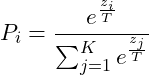
where i = 1 … K (in this case 10, which is the size of the vector).
Variable T known as temperature. It has the effect of amplifying or smoothing the difference between the most likely options and the rest. The following graphs show, for this example, the probabilities that softmax generates for different temperatures:
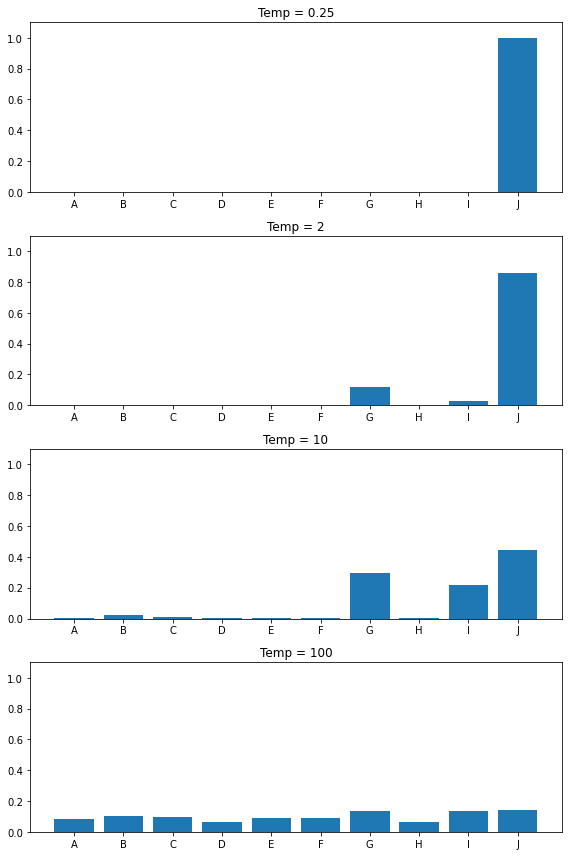
At low temperature values, the probability difference between the highest-scoring option and the next ones is enormous. As the temperature increases, that difference is reduced, and at very high values, we see that all options end up having similar probabilities. In the extreme case of an infinite temperature, we would have the same probability for all options.
This is why the temperature value makes the model’s responses less deterministic (more creative): while at low temperature an option with a low score is extraordinarily rare, at a higher temperature it is perfectly possible for it to be included in the response.
top K
Top-K filtering is based on keeping the K values with the highest probability, discarding the rest, and re-normalizing (so that the resulting new vector adds up to 1).
Let’s use the previous case as an example. Applying softmax with T=10 gives us (rounding) the following probability vector:
![\[\[\bordermatrix{ & A & B & C & D & E & F & G & H & I & J \cr & 0.08 & 0.11 & 0.10 & 0.06 & 0.09 & 0.09 & 0.14 & 0.06 & 0.13 & 0.14 }\]](https://ojosdemochuelo.net/wp-content/ql-cache/quicklatex.com-047348390121e0e66beb9dbe77b545f1_l3.png)
Applying now top K filtering with a value of 5 (we keep the 5 highest, which would be B, C, G, I, and J) and we normalize again, resulting in:
![\[\[\bordermatrix{ & B & C & G & I & J \cr & 0.11 & 0.10 & 0.14 & 0.13 & 0.14 } \longrightarrow \[\bordermatrix{ & B & C & G & I & J \cr & 0.17 & 0.16 & 0.23 & 0.21 & 0.23 } \]](https://ojosdemochuelo.net/wp-content/ql-cache/quicklatex.com-d1a7887fe0112064ff045b808e0d2cf6_l3.png)
top P
The last filtering option is top P. It is similar to top K because when applying it, we will keep several of the options with the highest probability and discard the rest. The difference is that, instead of a specific number of options (top K), what is kept is the minimum set of options, starting with the most probable one, whose accumulated probability exceeds the given number.
To see it clearly, let’s reorder the probability vector that we obtained after the top K filtering, and look at the cumulative probabilities:
![\[\[\bordermatrix{ & J & G & I & B & C \cr & 0.23 & 0.23 & 0.21 & 0.17 & 0.16 } \longrightarrow \[\bordermatrix{ & J & G & I & B & C \cr & 0.23 & 0.46 & 0.67 & 0.84 & 1.00 } \]](https://ojosdemochuelo.net/wp-content/ql-cache/quicklatex.com-32a532ab07ab56cfb3dfbcdb654af685_l3.png)
In this case, if the top P parameter we chose were 0.5, the first set of elements whose cumulative probability exceeds the value would be the one formed by J, G, and I. Once selected, the vector is normalized again to obtain the final result:
![\[\[\bordermatrix{ & J & G & I \cr & 0.23 & 0.23 & 0.21 } \longrightarrow \[\bordermatrix{ & J & G & I \cr & 0.34 & 0.34 & 0.32 } \]](https://ojosdemochuelo.net/wp-content/ql-cache/quicklatex.com-511f17593efd7cfbf8dc79cd92fe69e3_l3.png)
Stop sequences
The stop sequences parameter (stop for OpenAI, stopSequences for Gemini, stop_sequences for Anthropic) allows us to pass a list of text sequences that will immediately interrupt the text generation if any of them are encountered, and the sequence itself will not be included in the response.
Here’s a simple example. Executing the following call in Node.js:
import OpenAI from 'openai';

const client = new OpenAI();

const response = await client.chat.completions.create({
    model: 'gpt-3.5-turbo',
    messages: [{ 'role': 'user', 'content': 'Tell me who you are and who created you' }],
    stop: ['OpenAI']
});

console.log(response.choices[0].message.content);
the response gets interrupted when the sequence included in the stop parameter (OpenAI) was going to appear:
I am a language model AI created byThis functionality can be useful, for example, in cases where we expect a structured response with a specific ending; we can ensure that the generation ends when it reaches the string that we want to be the end, and that way save tokens by ensuring that the response does not include filler for which we would have to pay.
The problem I have found when using these parameters is that the OpenAI and Gemini APIs do not include any indication in the response of whether the response has stopped because it found one of the termination sequences, or if it just stopped by itself because the ending we expected never arrived. The Anthropic API, however, does include a specific termination code for this case, and also indicates the termination sequence that was found. So a positive point for Anthropic in this case.
Logit_bias
While discussing the temperature parameter, we mentioned that the scores given by the model to each token before converting them to probabilities are called logits. Keeping this in mind will help us understand how this parameter works, which consists of a JSON object that associates a series of tokens with a value (bias) between 100 and -100, which will be used to modify the score calculated by the model, thus modifying the probabilities (positively or negatively) of those tokens ending up being included in the response.
OpenAI’s documentation is not too specific about how exactly this bias is applied (it mentions that it depends on the model), but it does mention that while a bias of 1 or -1 will affect (positively or negatively) the selection of a token, values of 100 or -100 mean absolute certainty in the selection or exclusion of said token.
Here’s a simple example. We’ll start with this simple function call in Node.js:
import OpenAI from 'openai';

const client = new OpenAI();
const response = await client.chat.completions.create({
    model: 'gpt-3.5-turbo',
    messages: [{ 'role': 'user', 'content': 'In a single sentence, tell me about the company that created ChatGPT.' }]
});
console.log(response.choices[0].message.content);
OpenAI is the company that created ChatGPT, a powerful conversational AI model.Putting the output into Tokenizer, we see that OpenAI is composed of two tokens, 5109 and 15836. In fact, playing a bit with Tokenizer, we see that the tokens vary if the word is preceded by spaces, or if the capitalization changes:
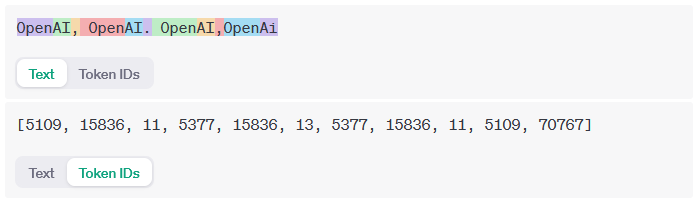
Let’s now make the same call, but using a logit_bias of -100 for those tokens we have identified for OpenAI:
const response2 = await client.chat.completions.create({
    model: 'gpt-3.5-turbo',
    messages: [{ 'role': 'user', 'content': 'In a single sentence, tell me about the company that created ChatGPT.' }],
    logit_bias: { 5109: -100, 15836: -100, 5377: -100, 70767: -100 }
});
console.log(response2.choices[0].message.content);
Executing it multiple times, these are some of the responses I got:
ChatGPT was created by the company, Chatbot, to provide a powerful AI solution for generating engaging and human-like conversations.
---
ChatGPT was created by the company, which is a leading provider of AI-powered natural language processing platforms.
---
The company that created ChatGPT is called AILabPage and specializes in artificial intelligence and natural language processing solutions.
Aside from it being funny to see poor GPT having to bend over backwards to manage and give a response, it’s important to note that the last of the answers is clearly false. So it should be taken into account that the use of this parameter can not only make the model avoid certain words, but it can also affect the reliability of the responses.
Executing again, but now modifying the bias for 15836 and making it +100 instead of -100, this would be the response
AIAIAIAIAIAIAIAIAIAIAIAIAIAIAIAIAIAIAIAIAIAIAIAIAIAIAIAIAIAIAIAIAIAIAIAIAIAIAIAIAIAIAIAIAIAIAIAIAIAIAIAIAIAIAIAIAIAIAIAIAIAIAIAIAIAIAIAIAIAIAIAIAIAIAIAIAIAIAIAIAIAIAIAIAIAIAIAIAIAIAIAIAIAIAIAIAIAIAIAIFrequency penalty
Frequency penalty is a number between 2 and -2 that allows us to reduce (or increase, in the case of a negative value) the repetitions of tokens in the response. It operates by modifying the value of the logits in the following way:

where  represents the logit‘s original value, and
 the number of times this token has already appeared in the response.
Therefore, the effective value of the penalty increases as that token appears more times in the response.
Presence penalty
Presence penalty is similar to frequency penalty in that it is also a number between 2 and -2, and it also modifies the logits to penalize repetitions, but it does so in a different way:

That is, the presence penalty is always the same when a given token has already appeared in the response at least once.