
Talking with language models, asking them questions, and getting explanations… all of these are great, but they have two significant limitations:
- Their knowledge is limited to their training data or the information we directly provide them.
- They cannot perform actions.
The ability to call functions allows applications based on large language models to overcome both limitations. They can call services to get information not available in their training data (current weather, flight statuses, stock quotes, etc.) or take actions (book flights, buy stocks, create calendar entries).
Most large language models offer some kind of functionality in their APIs to call functions. While the way they all work is quite similar, in this post we will focus on using the function-calling capabilities of the Google Gemini API.
Basic Concepts
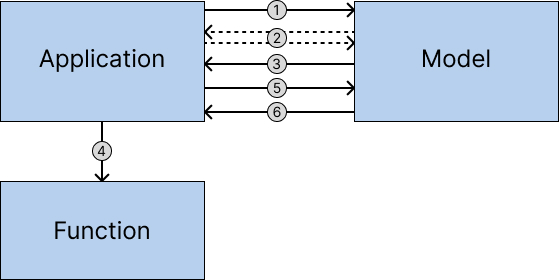
The first thing to clarify is that the language model itself won’t directly call the functions. Instead, the model will indicate that a function call needs to be made, and then our application will make the call for them. Detailing the interaction in more detail, the flow would be:
- The application starts the interaction with the language model, indicating the available functions along with their specifications (parameters, etc.).
- While the model doesn’t need a function call, the message exchange between the user and the model proceeds normally.
- When the model determines that a function call is required, it will send a message in a specific format, specifying which function to execute and with what parameters.
- The application detects that the received message is a function call and executes the appropriate function.
- The application sends a “function response” message back to the model with the function’s response.
- The model, now having the necessary information from the function, resumes the message exchange, benefiting from the additional information obtained from the function.
Olivia
To illustrate the use of function calls, let’s build Olivia, our personal kitchen assistant. Olivia will help us decide our menu and find new recipes. Additionally, she will serve as a recipe archivist, being able to save recipes and consult the ones we already have stored.
Libraries
We will implement our saveRecipe and listRecipes functions using sqlite, which allows us to persist the recipe database in a file easily. Along with sqlite, we need to install the Gemini library for JavaScript for this project.
npm install @google/generative-ai
npm install better-sqlite3
Function Specifications
To use the functions, Gemini needs us to specify them in advance. It’s important that the specifications are as clear and precise as possible in terms of description and input parameters to prevent the model from attempting to use them inappropriately or generating calls with incorrect parameters. In our case, we will specify our two functions – saveRecipe and listRecipes – as follows:
const saveRecipeDeclaration = {
    name: "saveRecipe",
    parameters: {
        type: "OBJECT",
        description: "Save a new recipe",
        properties: {
            name: {
                type: "STRING",
                description: "Name of the recipe.",
            },
            ingredients: {
                type: "STRING",
                description: "List of ingredients needed to prepare the recipe, with their quantities.",
            },
            instructions: {
                type: "STRING",
                description: "List of specific steps required to prepare the recipe, including order, cooking times, and any details that need to be specified so that a person with no prior knowledge can successfully make it.",
            },
        },
        required: ["name", "ingredients", "instructions"],
    }
};

const listRecipesDeclaration = {
    name: "listRecipes"
}
Implementation of Functions
The implementations for both services are:
let tableExists = false

function listRecipes() {
    let recipes, db;
    try {
        db = new Database('recipes.db');
        const stmt = db.prepare("select name, ingredients, instructions from recipe");
        recipes = stmt.all();
        tableExists = true;
    } catch {
        recipes = "There are no recipes.";
    } finally {
        db.close();
    }
    return recipes;
}

function saveRecipe(name, ingredients, instructions) {
    let result, db;
    try {
        db = new Database('recipes.db');
        if (!tableExists) {
            const stmtTabla = db.prepare(`CREATE TABLE if not exists recipe (
                [name] TEXT NOT NULL,
                [ingredients] TEXT,
                [instructions] TEXT)`);
            stmtTabla.run();
        }
        const stmtInsert = db.prepare("insert into recipe (name, ingredients, instructions) values (?,?,?)");
        stmtInsert.run(name, ingredients, instructions);
        result = "OK";
    } catch {
        result = "Error saving recipe";
    } finally {
        db.close();
    }
    return result;
}
System Message
To make Olivia behave as we want, it’s important to provide her with a detailed system message outlining our expectations. Although Gemini (unlike OpenAI or Anthropic) doesn’t have proper system messages, we will start the conversation with our system message, which works well enough. The message is as follows:
# WHO YOU ARE

You are Olivia, a great chef and recipe archivist. With your encyclopedic knowledge, you are capable of proposing recipes, rewriting them to the user's liking, and modifying them to suit their preferences.

# BEHAVIOR

Talk with the user, find out their tastes, advise them on possible recipes, and modify them according to their requests. Once the user confirms they are satisfied with the recipe, ask if they would like to save it, and if so, generate a call to the "saveRecipe" service.

If the user wants to know the recipes they already have saved, you must retrieve the saved recipes by calling the "listRecipes" service. This service will return a list of objects, each representing a recipe, with the structure explained below.

# RECIPE STRUCTURE

A recipe consists of three parts:
- Title
- Ingredients: a list of ingredients needed to prepare the recipe, with their quantities.
- Instructions: a list of specific steps required to prepare the recipe, including order, cooking times, and any details that need to be specified so that a person with no prior knowledge can successfully make it.
We will store the system message in a separate text file, which we will read and pass to the model at the start of the conversation.
Interaction with Gemini
All interaction with the language model will be encapsulated within a class, which we will call GeminiClient:
class GeminiClient {
    constructor(model, systemPrompt) {
        this.model = model;
        const genai = new GoogleGenerativeAI(process.env.GOOGLE_API_KEY);
        let genModel = genai.getGenerativeModel(
            {
                model: model,
                safetySettings: [
                    {
                        "category": "HARM_CATEGORY_HARASSMENT",
                        "threshold": "BLOCK_NONE"
                    },
                    {
                        "category": "HARM_CATEGORY_HATE_SPEECH",
                        "threshold": "BLOCK_NONE"
                    },
                    {
                        "category": "HARM_CATEGORY_SEXUALLY_EXPLICIT",
                        "threshold": "BLOCK_NONE"
                    },
                    {
                        "category": "HARM_CATEGORY_DANGEROUS_CONTENT",
                        "threshold": "BLOCK_NONE"
                    },
                ],
                tools: {
                    functionDeclarations: [saveRecipeDeclaration, listRecipesDeclaration],
                },
            }, { apiVersion: 'v1beta', });
        this.chatSession = genModel.startChat();
        this.chatSession.sendMessage(systemPrompt); // we don't display the response, so don't need to handle the promise
    }

    async _chat(functionName, functionResponse) {
        const ret = await this.chatSession.sendMessage([{ "functionResponse": { "name": functionName, "response": { recipes: functionResponse } } }]);
        return ret.response.text();
    }

    async chat(userMessage) {
        const resp = await this.chatSession.sendMessage(userMessage);
        let modelMessage;
        if (resp.response.functionCall()) {
            const fc = resp.response.functionCall();
            console.log("-- function call: " + fc.name); // To be able to tell if function is actually being called
            if (fc.name === "listRecipes") {
                modelMessage = await this._chat(fc.name, listRecipes());
            } else if (fc.name === "saveRecipe") {
                modelMessage = await this._chat(fc.name, saveRecipe(fc.args.name, fc.args.ingredients, fc.args.instructions));
            } else {
                modelMessage = "Function call!! " + fc.name; // Should never happen
            }
        } else modelMessage = resp.response.text();
        return modelMessage;
    }
}
Several things to note about this code:
- In the call to getGenerativeModel, we inform the parameter tools with the declarations of the two functions we want the model to use. Additionally, the Gemini library for JavaScript currently requires declaring the use of API version v1beta; without this, the function declaration call would fail, as function calls are not supported by API v1.
- Specifying the safetySettings helps ensure that Gemini blocks the conversation less often, especially for spicy recipes or comments on the size of melons or cucumbers.
- The startChat() call initializes a ChatSession class that saves us from having to maintain the conversation history. If we wanted more control over this and manage it manually, we could change it and use the generateContent service instead.
- The responses (except for errors, which this code does not handle) will include either text or a function call. Our code identify when the response is a function call, execute the appropriate function, pass the function’s response to the model (done by the _chat method) using a functionResponse message, and the model’s response to this second message will be shown to the user. In a normal case, for the response taking a bit longer, the user will not realize that a function call has occurred, although in this case, I have opted to keep a message on screen to be able to tell when a function call occurs.
Chat Interface
Finally, we just need the main body of the script, which will read the system message from a file, instantiate the GeminiClient class, and display the chat interface in a loop:
import * as readline from "node:readline/promises";
import { GoogleGenerativeAI } from "@google/generative-ai";
import fs from "fs";
import Database from 'better-sqlite3';

const rl = readline.createInterface({
    input: process.stdin,
    output: process.stdout
});

let client = new GeminiClient("gemini-1.0-pro", fs.readFileSync("olivia.md", "utf8"));
let userText;
while (userText = (await rl.question('What do you want to say to Olivia?\n> ')).trim()) {
    console.log(await client.chat(userText));
}
rl.close();
And with that, we have Olivia finished! I hope it proves useful, but above all, that this example has made it clear how to use function call functionality, which can greatly expand what we can do with our applications based on large language models.
As usual, the complete code can be found on GitHub.
Final Comments
When I started testing function calls in preparation for writing this post, everything worked exceptionally well. Gemini called the functions at just the right time, and the interaction felt very natural.
However, recently I have been finding that Gemini responds as if it had called the functions (“Recipe saved.”, “Here are the recipes we have saved…”) when in fact it hasn’t. There have been times when I had to insist several times for it to finally make the function call, while there were other times when I couldn’t get it to call the function at all. Interestingly, the model gemini-1.0-pro is currently giving me the best results, outperforming gemini-1.5-pro and gemini-1.5-flash.
The reason I chose the Gemini API when writing this post was because they recently announced a developer competition, and it seemed like a good opportunity to explore its possibilities in more depth. Unfortunately, in its current state, I would not recommend using Gemini as the basis for developing my applications. Let’s hope the situation improves in a future update.